How it works

EVA, up close.

Eldercare Visits & Administration

EVA is one platform made of tools that share a single record. Plan the day in the planner, shape each visit in the visit builder, keep medication in step, control who can do what with roles and delegations, and capture the day in reports, then send it all to the worker's phone and watch it come back, live. Below, each part at full size, with how it actually works.

Planner

One grid for the entire day.

The planner is the cockpit. Every colleague is a row, every visit a block, and time runs left to right. You build the day by dragging visits onto workers and stretching them to the right length, and the whole department is readable at a glance.
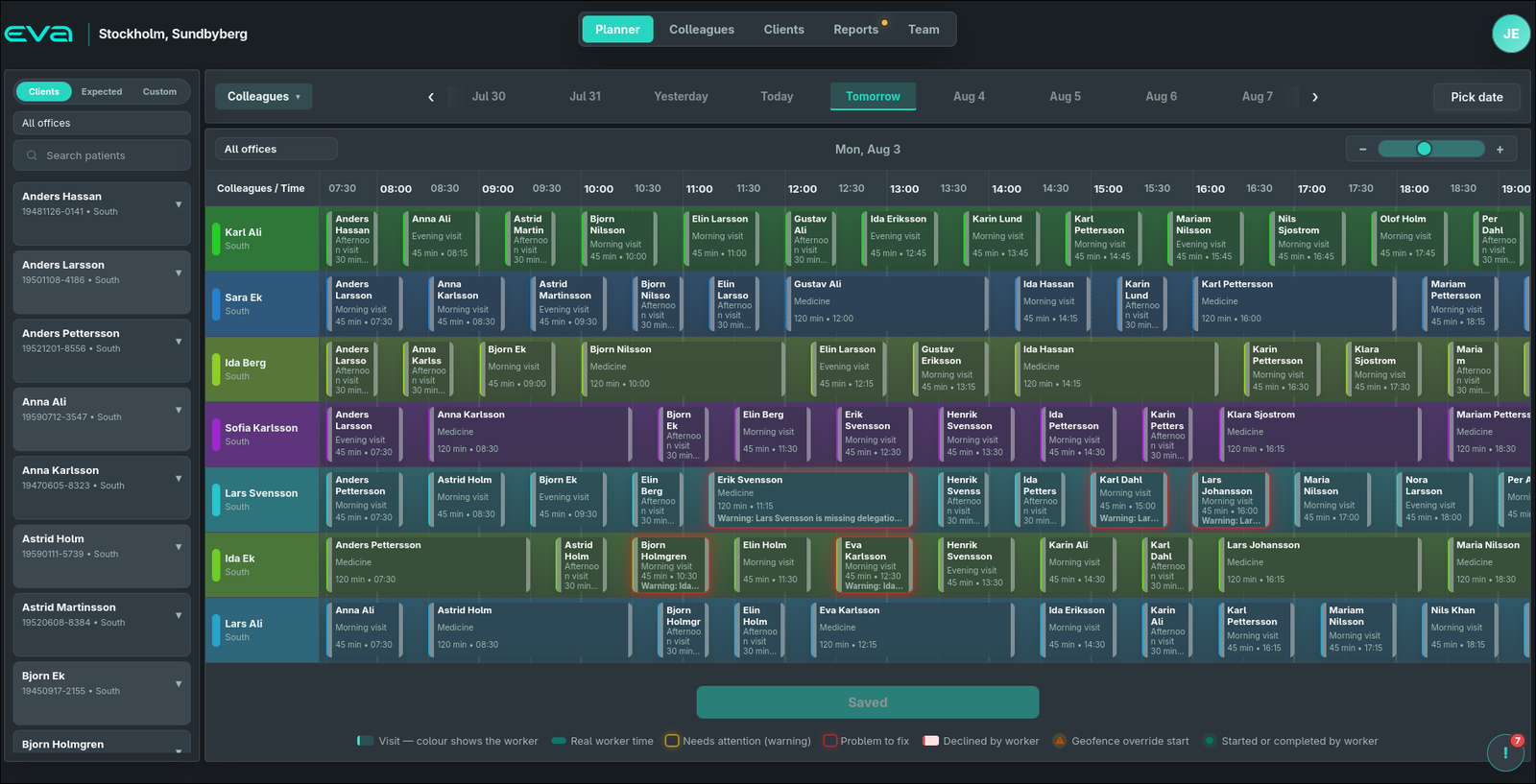
Planner · Stockholm, Sundbyberg
The EVA planner: colleagues listed as rows, a time axis across the top, and colour-coded visit blocks per worker with warnings outlined in red and a legend along the bottom.

Colour identifies the worker, so you read ownership instantly. Three sources feed the grid: Clients you schedule directly, Expected visits generated from recurring templates, and Custom one-offs, so tomorrow's demand is visible before it's fully booked. The legend along the bottom is the safety layer: warnings, problems to fix, declined visits, geofence-override starts, and visits a worker has already started or completed.

  • Drag to reschedule, stretch to change length
  • Colour-coded per colleague for instant ownership
  • Clients / Expected / Custom visit sources
  • Filter by office; zoom from hours down to minutes
  • Warnings for missing delegations and declines
  • Real worker time shown against the plan
Visit builder

Every visit, built from what really happens.

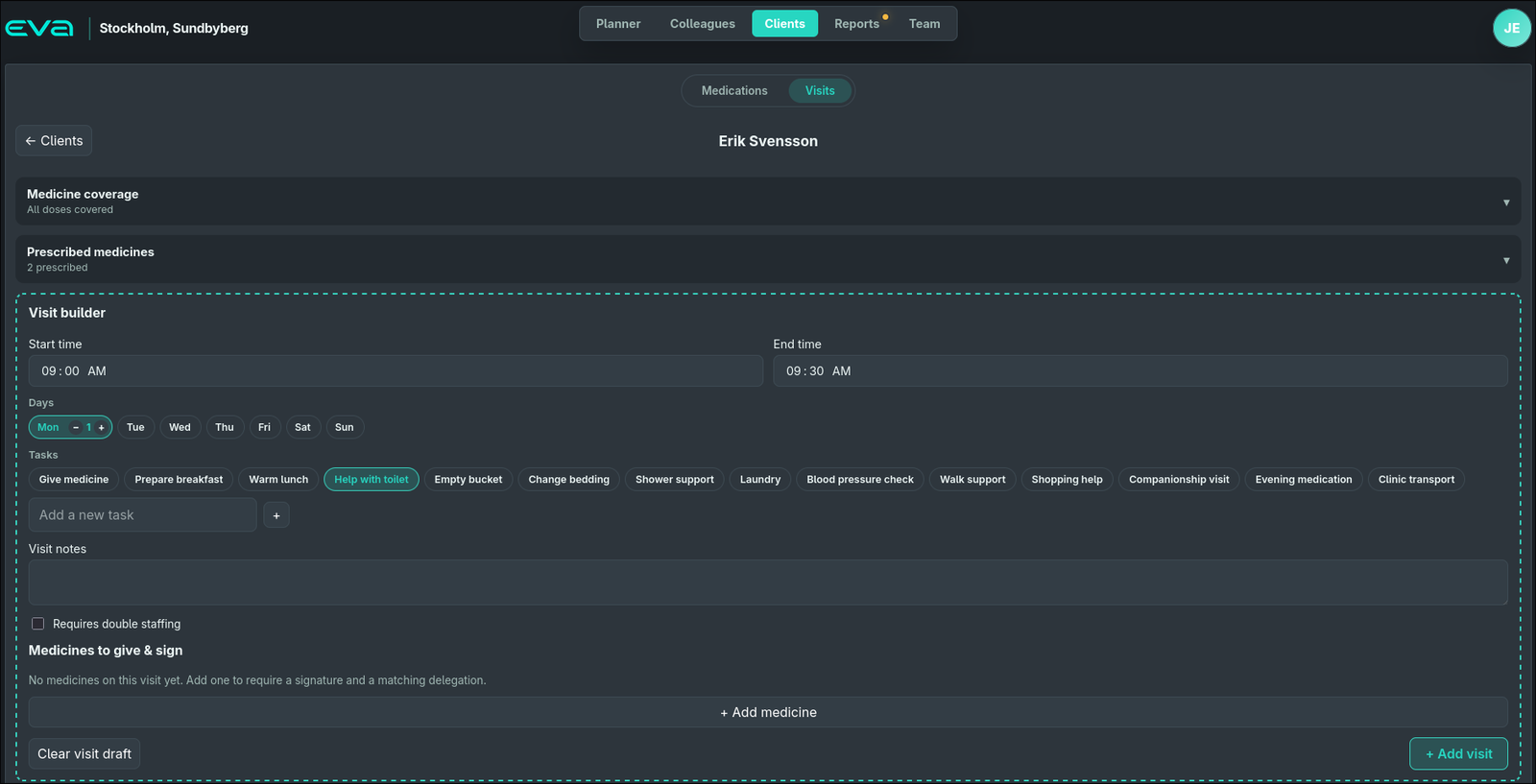
Open a client and compose a visit the way care is actually delivered: set the start and end time, choose the days, then pick the tasks (give medicine, prepare breakfast, shower support, companionship) from reusable chips or your own.

Clients · Visit builder
The EVA visit builder with start/end time, day steppers, a palette of task chips, visit notes, a double-staffing toggle, and a medicines-to-give-and-sign area, with medicine coverage and prescribed medicines panels above.

Above the builder, two folding panels keep you honest: Medicine coverage tells you at once whether every planned dose has a visit to give it, and Prescribed medicines lists what's on the client's plan. Attach the medicines that must be given on this visit and each one requires a signature and a matching delegation, so an unqualified assignment can't slip through. Mark a visit as double-staffed when two people are needed.

  • Reusable task chips, plus custom tasks
  • Medicine coverage flags any uncovered dose
  • Medicines to give & sign, per visit
  • Every medicine needs a signature + delegation
  • Double-staffing toggle for two-person visits
  • Free-text visit notes for context
Medication planning

Medication that stays in step with the schedule.

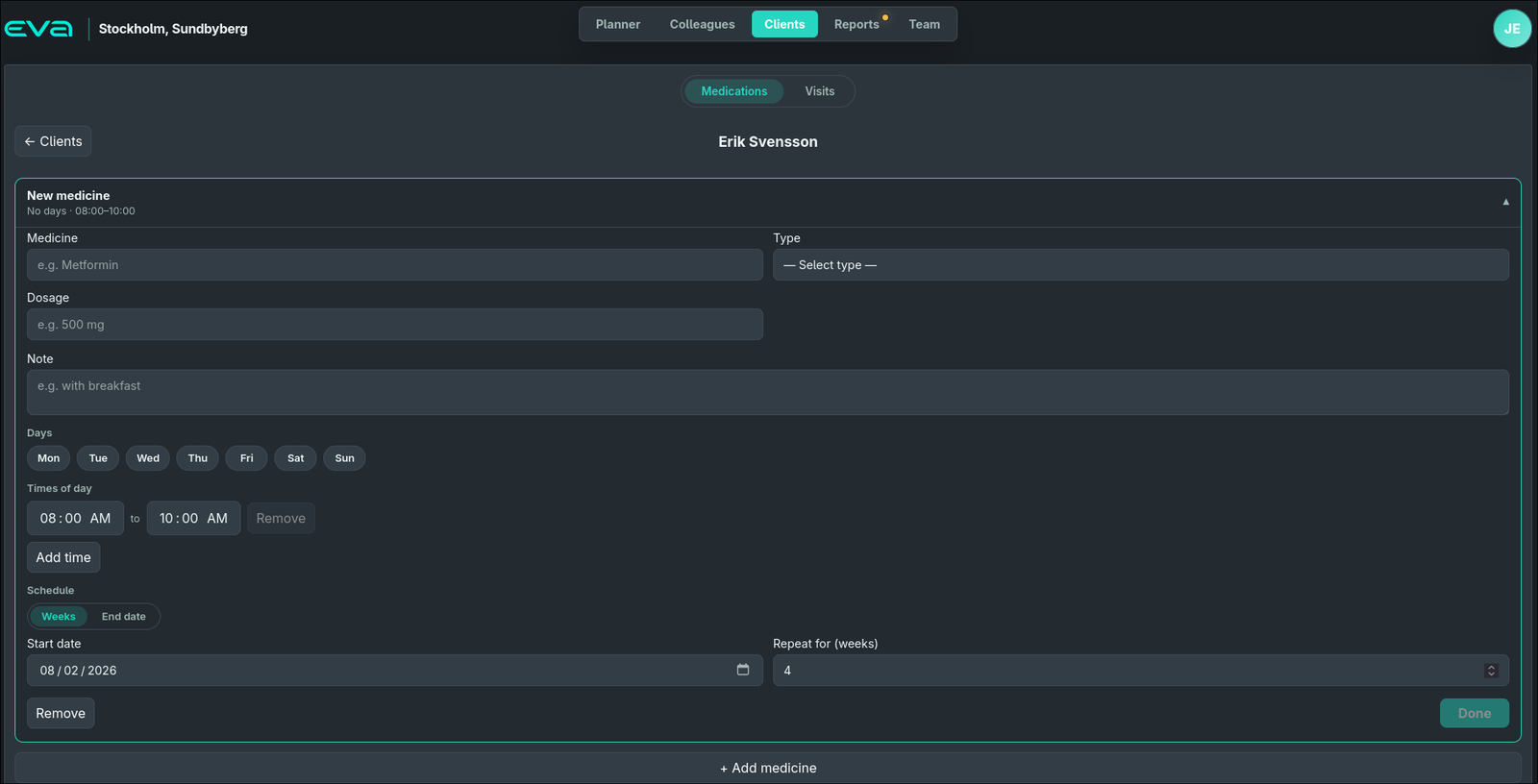
Plan each medicine as its own card: the medicine and type, the dosage, an optional note, the days and times of day it's due, and how long it runs: a number of weeks or a fixed end date. Finish one with Done and it saves; add the next.

Clients · Medications
The EVA medication planner card with fields for medicine, type, dosage, note, day pickers, times of day, and a weekly-or-end-date schedule, with a Done button and an Add medicine button.

Each dose carries a delegation type, and EVA checks it against the worker assigned to give it, the same check the planner surfaces as a warning. Because the medication plan and the visits share one record, a dose without a covering visit shows up as a coverage gap rather than being silently missed. Saving happens the moment you add a medicine, so nothing is lost between screens.

  • Type, dosage, days, times and schedule per medicine
  • Weekly repeats or a fixed end date
  • Delegation type checked against the assigned worker
  • Coverage gaps surfaced, not hidden
  • Auto-saved as each medicine is added
  • Feeds straight into the visit builder
Roles & permissions

Access shaped to the person.

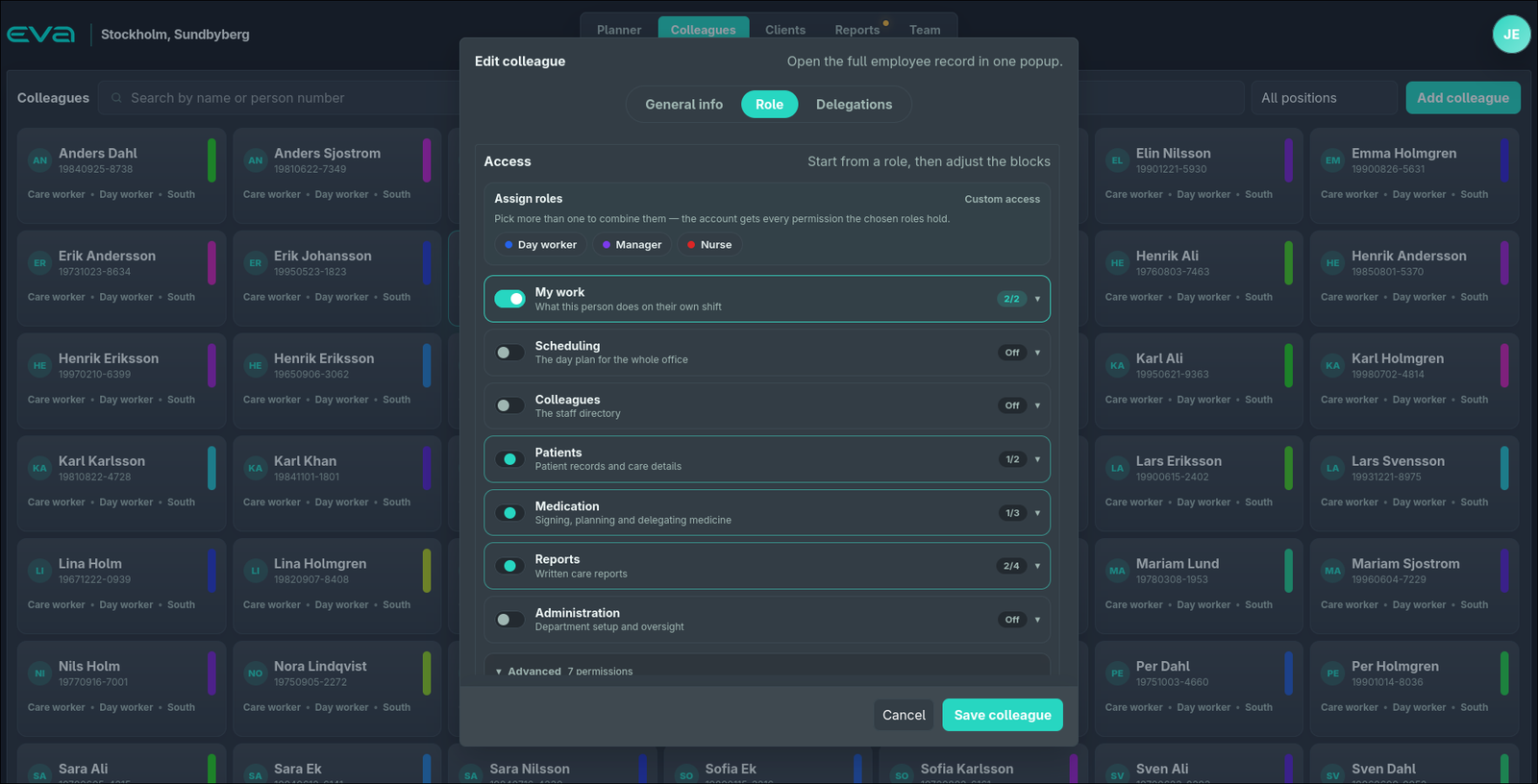
Open a colleague and start from roles (Day worker, Manager, Nurse), combining as many as you need; the account receives the union of everything they grant. Then tune access module by module with clear on/off toggles and counts.

Colleagues · Role
The EVA colleague editor showing General info, Role and Delegations tabs; role chips for Day worker, Manager and Nurse; and permission modules such as My work, Scheduling, Colleagues, Patients, Medication, Reports and Administration with toggles and counts.

Permissions are grouped into readable modules: scheduling, patients, medication, reports, administration, each showing how many of its permissions are on. Under a separate Delegations tab, you decide medicine by medicine what this person is allowed to give; that's the delegation the visit builder and planner enforce. Roles are a starting point, never a cage. Anything ticked by hand on top survives.

  • Stackable role presets, each with its own colour
  • Per-module toggles with live permission counts
  • Delegations set medicine-by-medicine
  • Manual tweaks on top of a role are kept
  • Advanced permissions tucked away until needed
  • Important changes recorded to an audit trail
Reports & journal

The day's story, kept together.

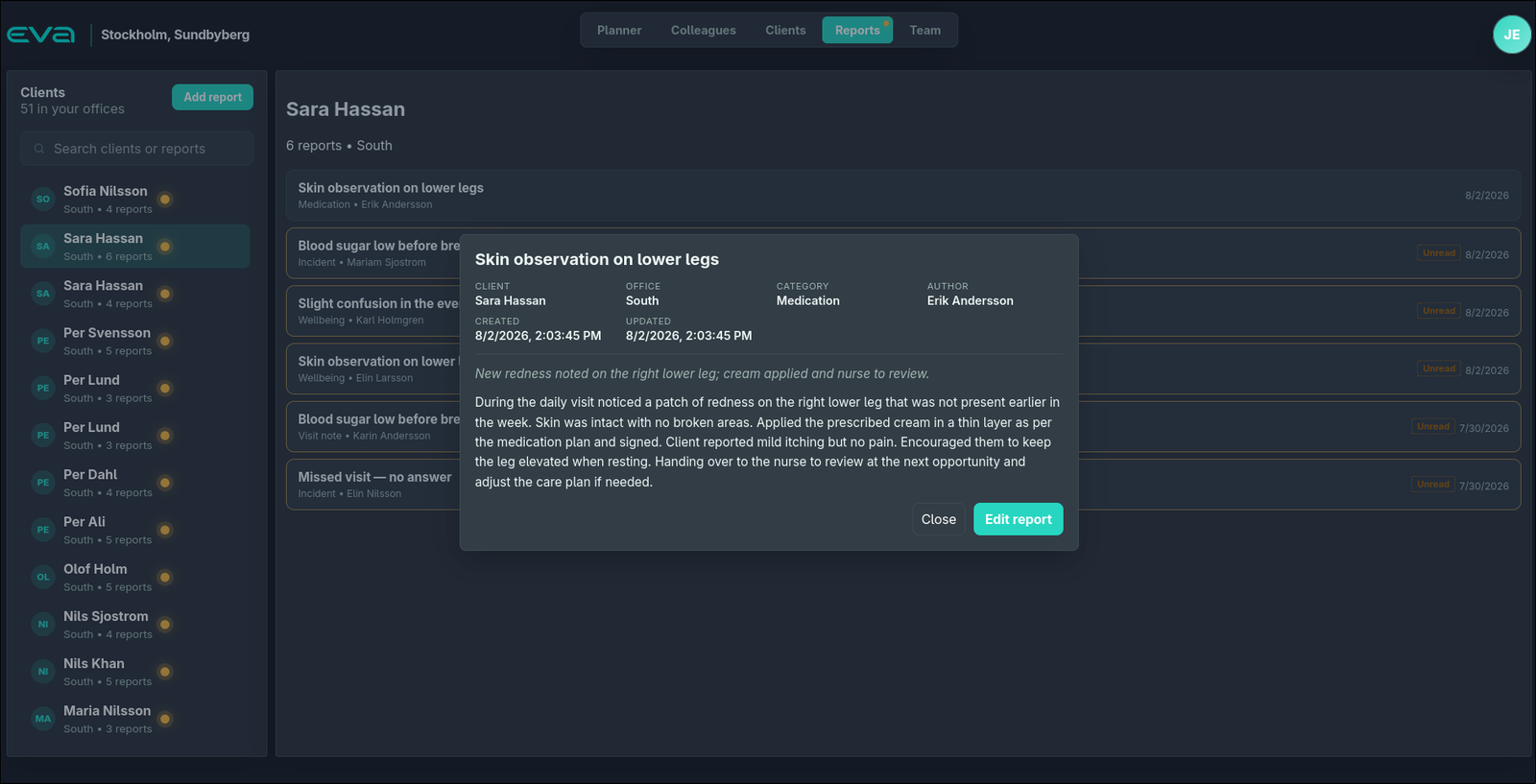
Reports are written against the right client, tagged by category and author, and scoped to the offices a person covers. The list makes the important things impossible to miss: a skin observation, a low blood sugar, a missed visit.

Reports · Care journal
The EVA reports view: clients listed with report counts and unread dots, a selected client's reports with categories and authors, and a report detail popup with client, office, category, author and timestamps.

Unread markers sit on both the client and each report, so nothing carries over a shift unnoticed. Open any report for the full picture: client, office, category, author, and created and updated timestamps, and edit it in place. It's the care journal, living in the same platform as the plan that produced it.

  • Reports tied to client, office, category and author
  • Unread indicators per client and per report
  • Incident, medication, wellbeing and visit-note types
  • Full detail view with timestamps
  • Office-scoped to what a person covers
  • Created and edited inside the platform
Let's talk

Want to see it on your own operation?

We'll walk you through EVA end to end: planner, medication, permissions, reporting and the mobile app.

Reach us directly at info@encorpia.com to inquire about the service.