
Every planned medicine dose is matched to a visit. If one isn't, EVA flags it before the day even begins.
Care operations platform
The whole care operation, running in one place.
Eldercare Visits & Administration
EVA connects daily planning, home visits, medication, staff permissions and care reporting, then puts the same live picture in the hands of workers on their phones. One platform instead of a drawer full of disconnected tools.
- 6tools in one workspace
- Web + mobileone shared backend
- Role-awareaccess down to the block
All doses covered
Missing delegation flagged
The plan watches your back and shows you the day as it really happens.
If an assigned worker isn't delegated for a medicine on their visit, the plan warns you in red while there's still time to reassign.
Live status shows who has started, who's on site and who has finished, with geofence-aware visit starts, so you know work happened where it should.
Real start and end times flow back from the field, so planned versus actual is always visible at a glance.
Built for home care and assisted-living teams (planners, nurses, care workers and administrators) who are tired of stitching together schedules, spreadsheets, medication lists and paper journals.
Everything a care team touches in a day, under one login.
Each module is a full tool on its own. Together they share one data model, so a change in the plan reaches the medication list, the worker's phone and the report without anyone re-typing it.
Planner
Drag-and-drop the whole day across colleagues and time. Colour-coded by worker, with live warnings.
Visit builder
Compose each visit from tasks, times and days. Attach medicine to give & sign, and flag double-staffing.
Medication planning
Plan doses by type, dosage, days, times and schedule, checked against each worker's delegations.
Roles & permissions
Combine role presets, then tune access module by module. Delegations decide who may give which medicine.
Reports & journal
Office-scoped care reports with categories, authors and unread markers: the day's story, kept together.
Mobile worker app
The same live plan on the worker's phone: start visits, sign medicine and report back from the field.
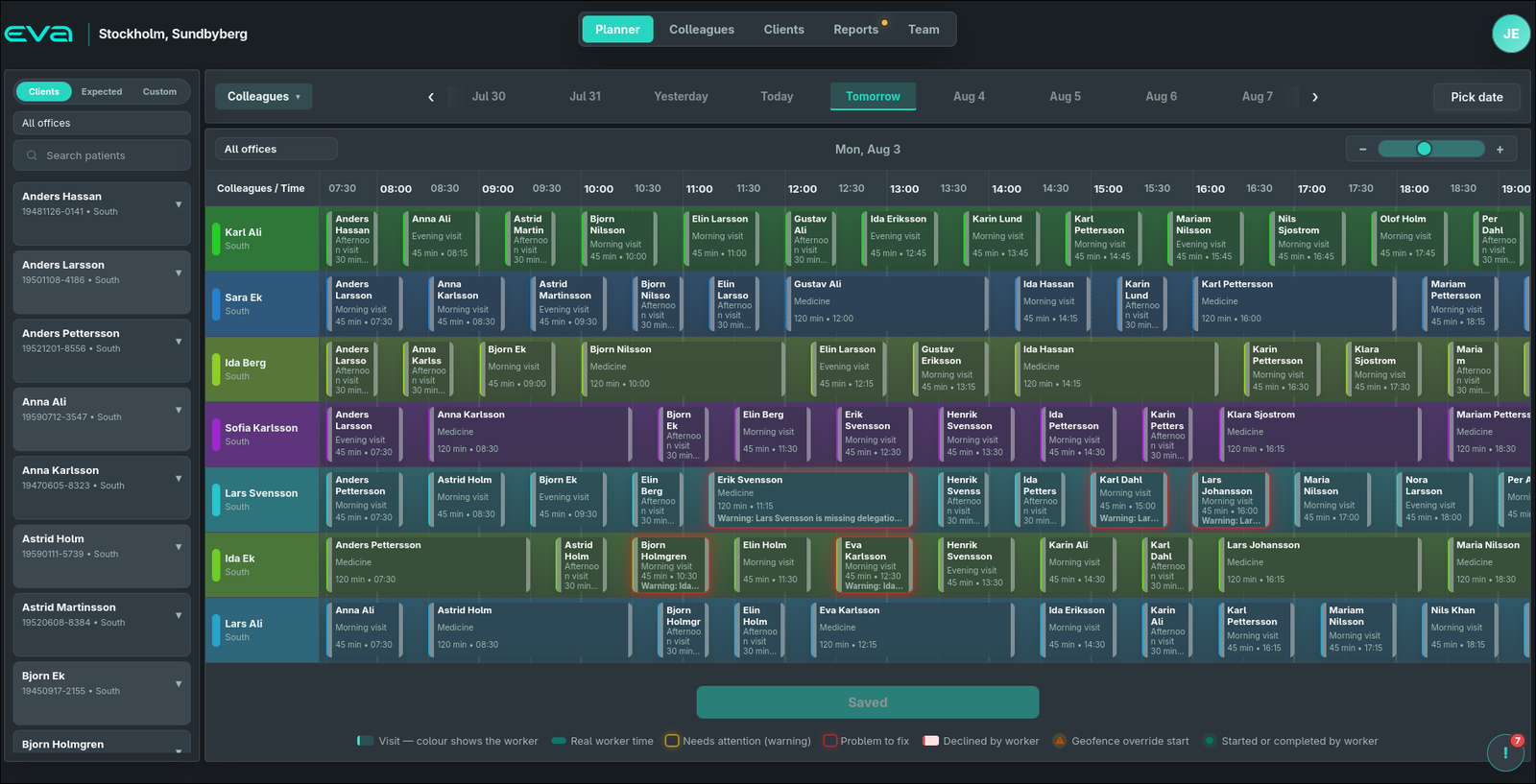
Planner
Plan the whole day on one grid.
Every colleague gets a row, every visit a block. Drag to reschedule, stretch to change the length, and read the whole department at a glance. Colour tells you who's on each visit.
- Switch between Clients, Expected and Custom visit sources
- Live warnings for missing delegations, declines and geofence overrides
- Planned vs. real worker time, side by side
- Filter by office and day; zoom the timeline from hours down to minutes
Visit builder
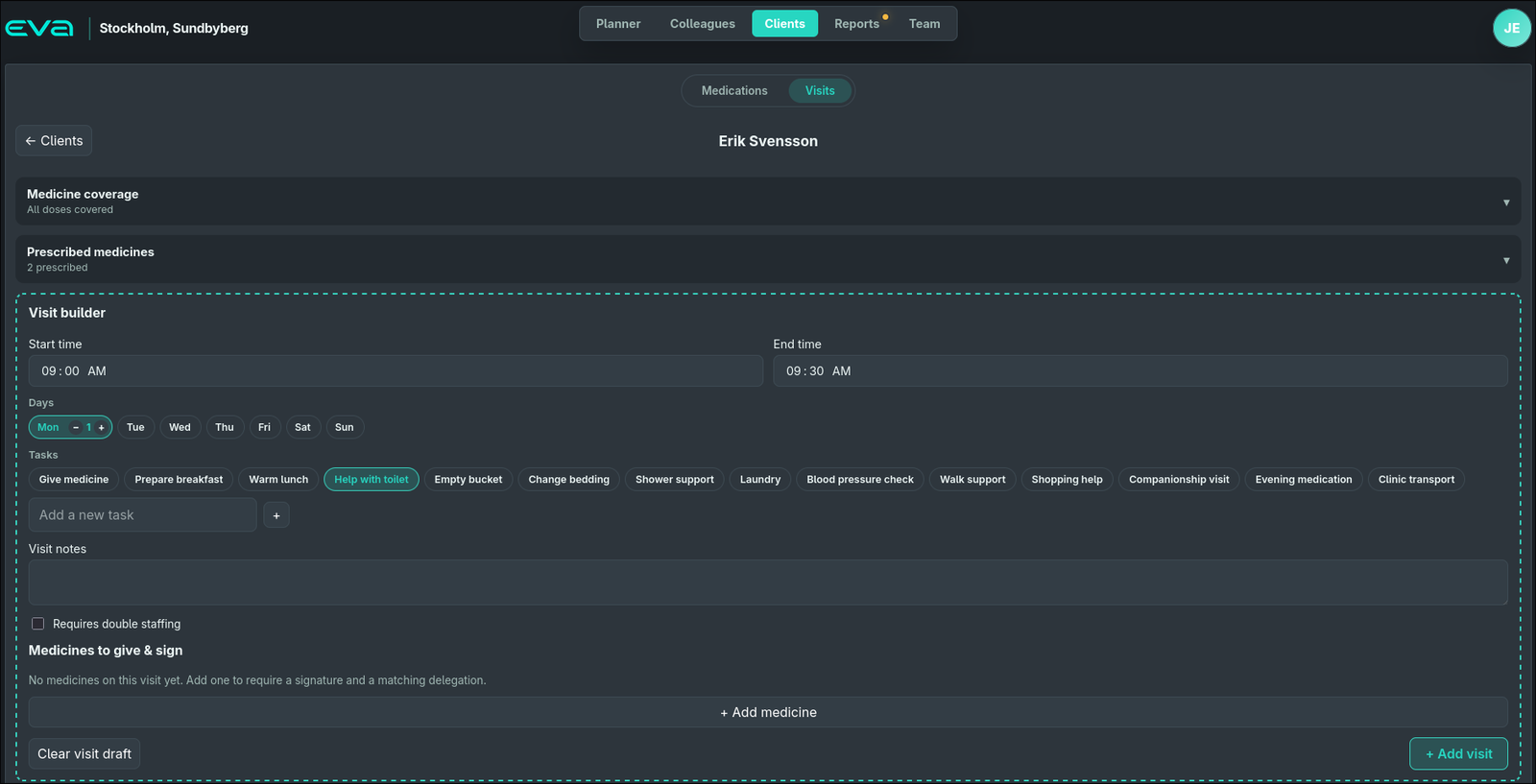
Build a visit the way care actually happens.
Pick the time and days, then assemble the visit from real tasks: give medicine, prepare breakfast, shower support, companionship. Add the medicines that must be given and signed, and the plan knows who's qualified to give them.
- Reusable task chips, plus your own custom tasks
- Medicine coverage tells you instantly if a dose has no visit
- Mark visits that require double staffing
- Every medicine on a visit requires a signature and a matching delegation
Medication planning
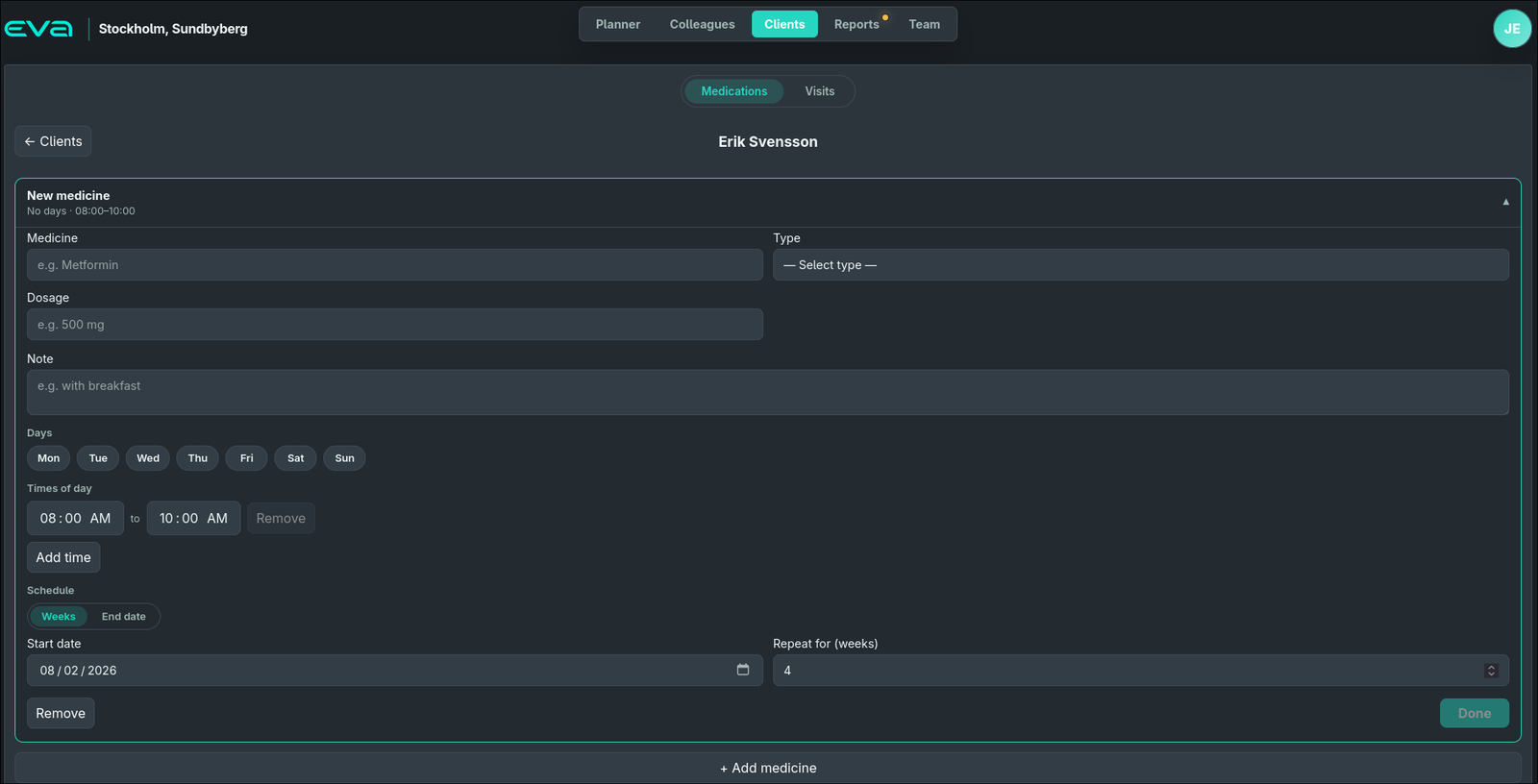
Medication that stays in step with the schedule.
Plan each medicine as its own card: dosage, type, the days and times it's due, and how long it repeats. Finish one and it's saved; add the next. The plan feeds straight into visits so nothing due is left uncovered.
- Weekly repeats or a fixed end date, per medicine
- Delegation type set per dose, checked against the assigned worker
- Coverage warnings surface doses with no visit to give them
- Saved automatically the moment a medicine is added
Roles & permissions
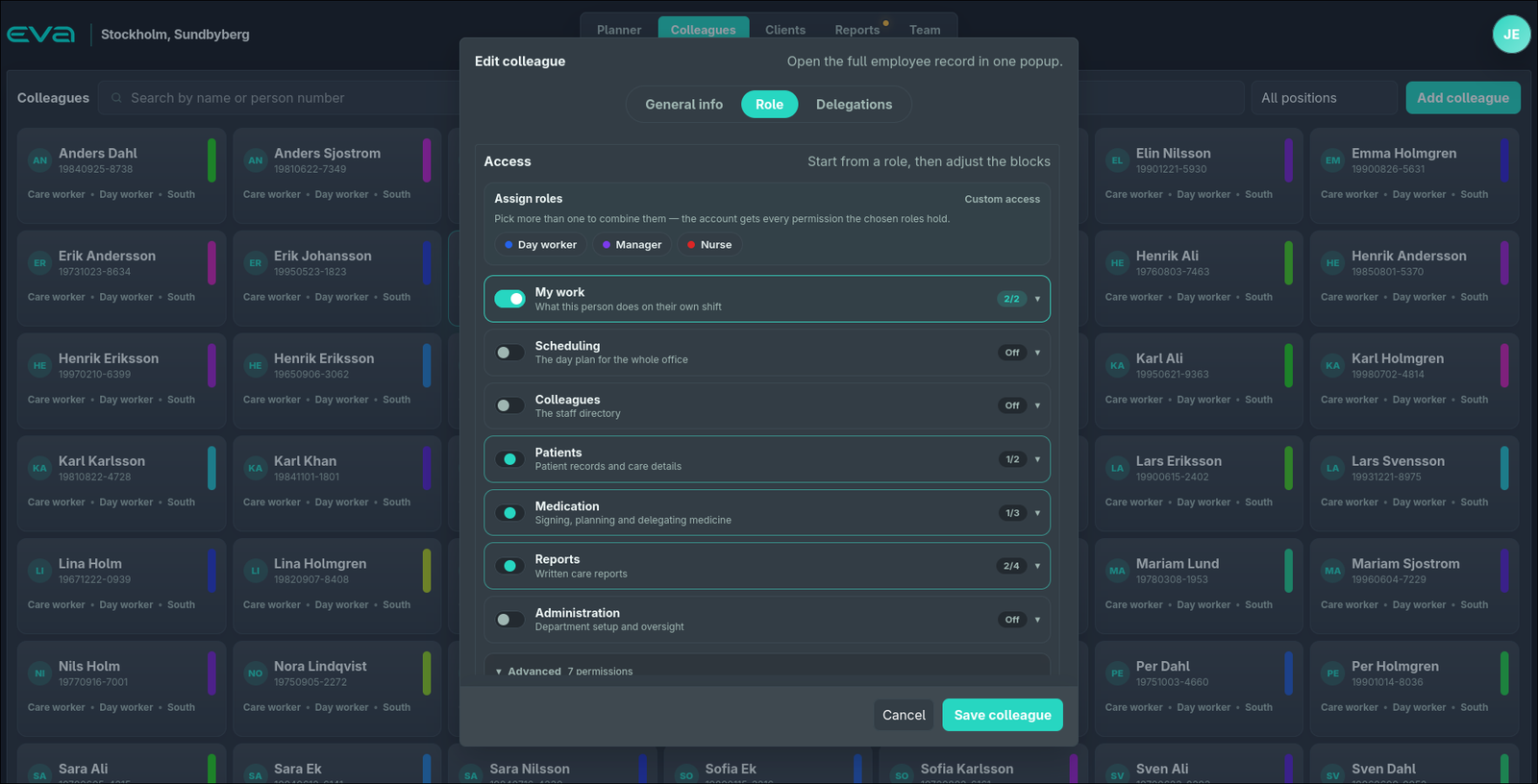
Access that fits the person, not a rigid tier.
Start from a role (Day worker, Manager, Nurse) and combine as many as you need; the account gets the union of what they grant. Then fine-tune access module by module. Delegations decide, medicine by medicine, who is allowed to give what.
- Stackable role presets with their own colours
- Module toggles: scheduling, patients, medication, reports, administration
- Delegations shown as a clean, searchable grid
- Important changes are recorded to an audit trail
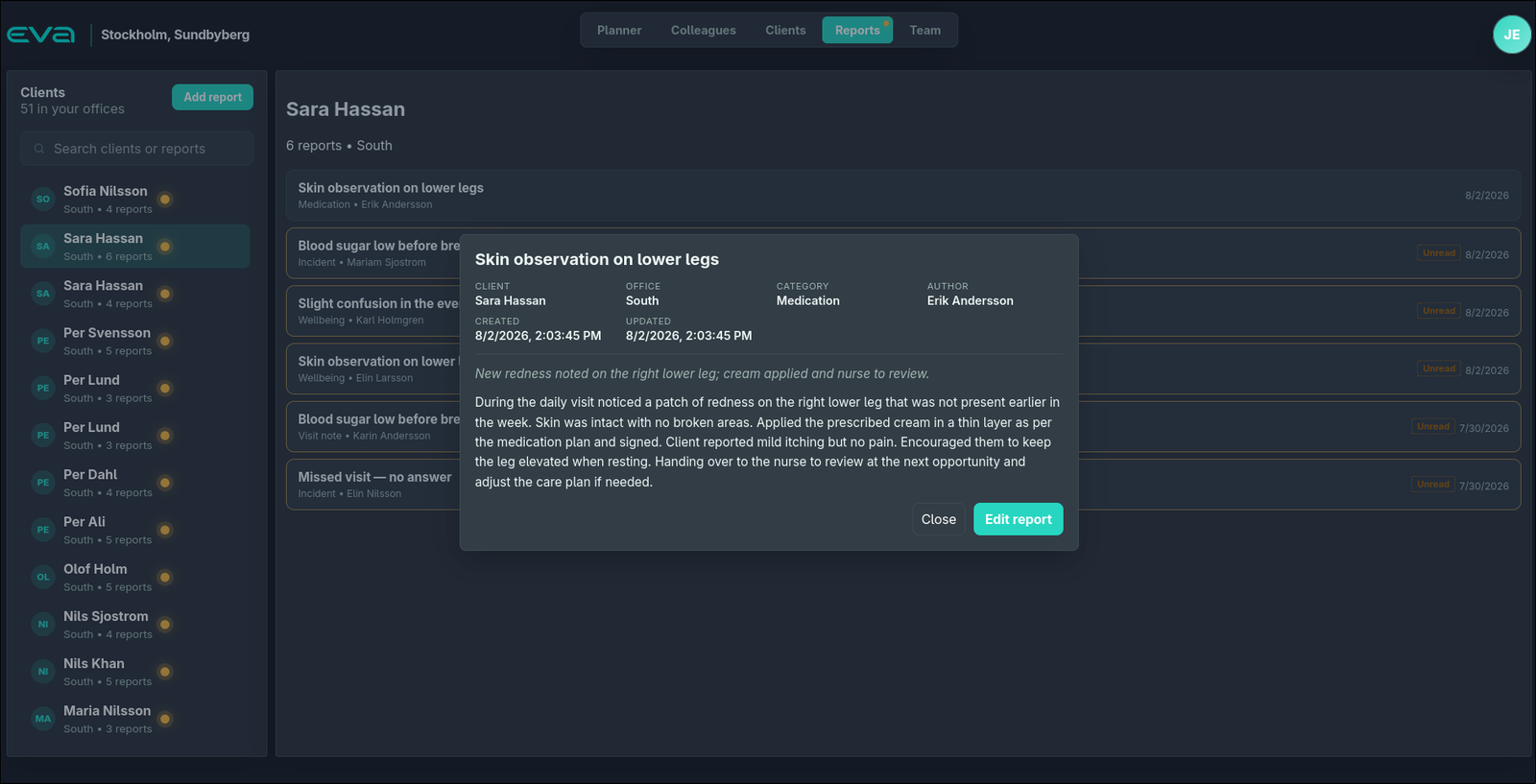
Reports & journal
The day's story, written where the care happens.
Care workers write reports against the right client, tagged by category and author, scoped to the offices they cover. Unread markers make sure a skin observation or a missed visit doesn't slip past the next shift.
- Reports tied to clients, offices, categories and authors
- Unread indicators per client and per report
- Incident, medication, wellbeing and visit-note categories
- Full detail view with created and updated timestamps
Fewer tools. Fewer handovers. Fewer avoidable mistakes.
Connected, not stitched
Planner and mobile worker flows share one backend, so the office and the field see the same day, live.
One workspace for everyone
Planners, nurses and administrators work in the same place instead of splitting across separate systems.
Warnings before they cost you
Missing delegations, uncovered doses and declined visits are flagged while there's still time to fix them.
Demand you can see coming
Expected visits make recurring care load visible before the day is fully booked.
Planned vs. real
Actual runtime sits next to the plan, so drift between what was scheduled and what happened is obvious.
Access with intent
Role presets and per-module permissions keep people in exactly the parts of the platform they should touch.
One consistent record
Employees, clients, schedules, medication and events live in a single, coherent data model.
Built to grow up
A clear path from working platform toward full care operations, without swapping out the whole stack.
On the phone, in the field
The plan travels with the worker.
The EVA mobile app puts each worker's day in their pocket. They see their assigned visits, start and complete them on site, sign for the medicine they give, and send updates straight back to the same platform the office is watching.
- Today's visits, in order, on the worker's device
- Start, complete and report visits from the client's home
- Sign medicine against the delegation on file
- Runtime flows back to the planner in the office
Mobile screenshots are on their way. The frames below are placeholders for now.
eva
Worker app
Screenshot coming soon
eva
Today's visits
Screenshot coming soon
EVA is the operational spine of a care team.
It's the role-aware, day-to-day platform where planning, medication, permissions, reporting and mobile execution finally sit together: a foundation built for auditability and real visit lifecycles, ready to grow with the operation it runs.
Let's talk
See EVA on your own care operation.
Tell us how your team plans its days and we'll walk you through EVA (planner, medication, permissions, reporting and the mobile app) end to end.
Reach us directly at info@encorpia.com to inquire about the service.